Invoice ↔ PO ↔ Receipt Matching
Line-level 3-way matching that catches what manual review misses
Compare every invoice line against PO terms and receipt data. Catch price inflation, quantity mismatches, and unapproved charges — automatically, at scale.
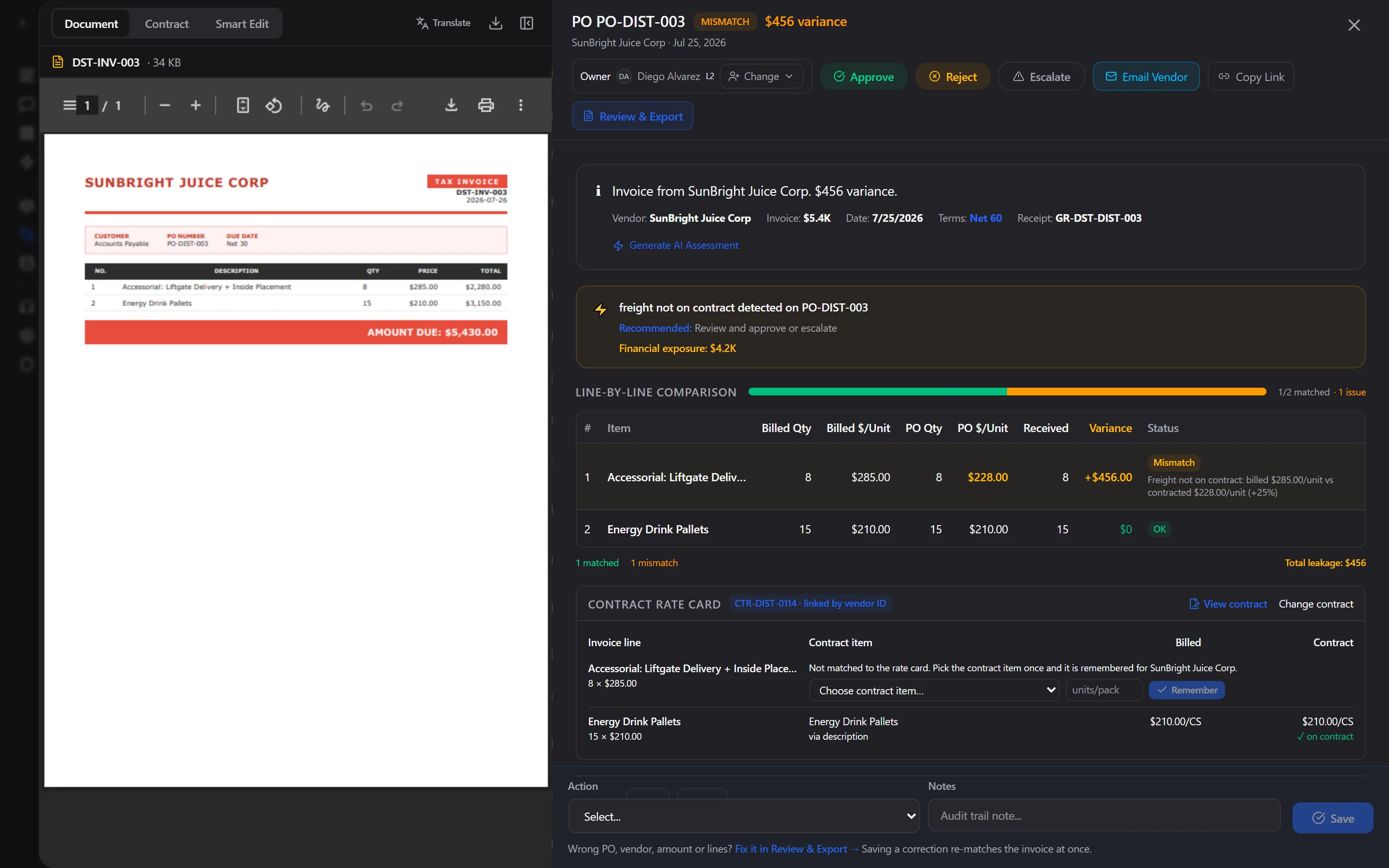
Invoice, purchase order, receipt and contract reconciled line by line: here, freight billed at $285 against a $228 contract rate. Live product, synthetic data.
Every line
Matched & Priced
<1 sec
To Match Each Invoice
60–80%
Touchless Target (Clean POs)
19.9%
Invoices With Exceptions (Ardent 2026)
How it works
Upload or ingest invoices
Drop PDF invoices, connect email/SharePoint, or sync from your ERP. AI extracts every line item — vendor, description, quantity, unit price, totals.
Match against PO & receipt
Each invoice line is matched to the corresponding PO line and goods receipt using fuzzy matching, SKU resolution, and UOM normalization.
Flag exceptions
Price variances, quantity mismatches, missing receipts, and duplicates are flagged with severity scores and dollar-value leakage amounts.
Review, approve & export
Clean matches auto-approve. Exceptions go to an owner, a named person or a review team, with PO terms, receipt data and the contract rate attached. A misread field is corrected in Review & Export and the invoice re-matches at once; approved invoices export to your ERP in its own format.
Capabilities
7-phase match pipeline
Extraction → PO lookup → line matching → price comparison → receipt validation → exception detection → routing. Each phase produces auditable results.
Fuzzy line matching
Handles SKU mismatches, unit-of-measure differences, split deliveries, and partial shipments. No rigid templates — adapts to any vendor format.
Configurable tolerances
Set price and quantity tolerance thresholds per vendor, category, or globally. Rules engine supports skip rules, auto-approve rules, and routing rules.
Leakage quantification
Every exception includes a dollar-value leakage amount. Dashboard shows cumulative savings from catches, recovery rates, and processing velocity.
Expected cost & contract price checks
Compare invoice prices against both PO terms and expected cost (product master). Detects vendor price creep even when POs are accurate.
Receipt pending awareness
Distinguishes between "leakage detected" and "goods in transit." Recommends hold-for-GR vs. reject based on receipt status.
Correct and re-match in one place
Review & Export shows the source invoice beside every field read. Fix a misread PO, vendor, total or line and the invoice re-matches at once; the correction is validated and audited, and never approves anything by itself.
Owners, review levels and escalation
Every exception has an owner. Routing rules place large invoices with the right level (for example over $25K to AP Manager), and anyone deciding can escalate to the next level or a named person.
AI-drafted vendor emails
Email Vendor on any exception drafts the message from the match itself: the lines, billed vs. PO or expected price, and the dollar variance. Your team edits and sends it.
Frequently asked questions
What formats do you support?
Any PDF invoice, scanned or digital. Also Excel, CSV, and EDI. Multi-language OCR supports 90+ languages natively.
How fast is it?
A typical invoice is read and matched in about 10 seconds, and 9 in 10 finish in under 20. The line-level match itself takes under a second; most of the time is the AI reading the document, so simple one-page invoices are quicker and long multi-page ones take a little longer.
Do I need to configure templates per vendor?
No. AI extraction adapts to any invoice format without templates. New vendors work on day one.
How do you handle partial shipments?
The engine tracks split deliveries and partial receipts. A single PO line can match against multiple invoice lines across shipments.
What ERP integrations are available?
Oracle, SAP, SQL Server, PostgreSQL, Snowflake, NetSuite, QuickBooks — any database with PO and receipt tables.
What if the AI misreads an invoice?
Open it in Review & Export: the source document sits beside every field read, with its confidence and the checks it passed. Correct the PO number, vendor, total or a line and the invoice re-matches at once. The correction is validated, written to the invoice, kept on the record and audited; it never approves the invoice by itself.
Who approves exceptions?
Whoever owns them. Each invoice has an owner, a named person or a review level such as AP Team, AP Manager or Finance Director, bound to a group in your identity provider. Routing rules can send large invoices straight to a higher level, and anyone deciding can escalate to the next level or a named person, with the evidence attached.
See what we find before you commit.
Read-only connection. We review a sample of your invoices, agreements and supplier spend, then hand back a findings report with specific figures. If there is nothing to recover, there is nothing to pay.