Review, Correct, Approve & Export — One Screen
The AI reads the invoice. Your team has the last word.
Review & Export puts the source invoice beside every field the AI read, every validation check and every exception. Correct what it got wrong, re-match at once, then approve and export to your ERP in its own format.
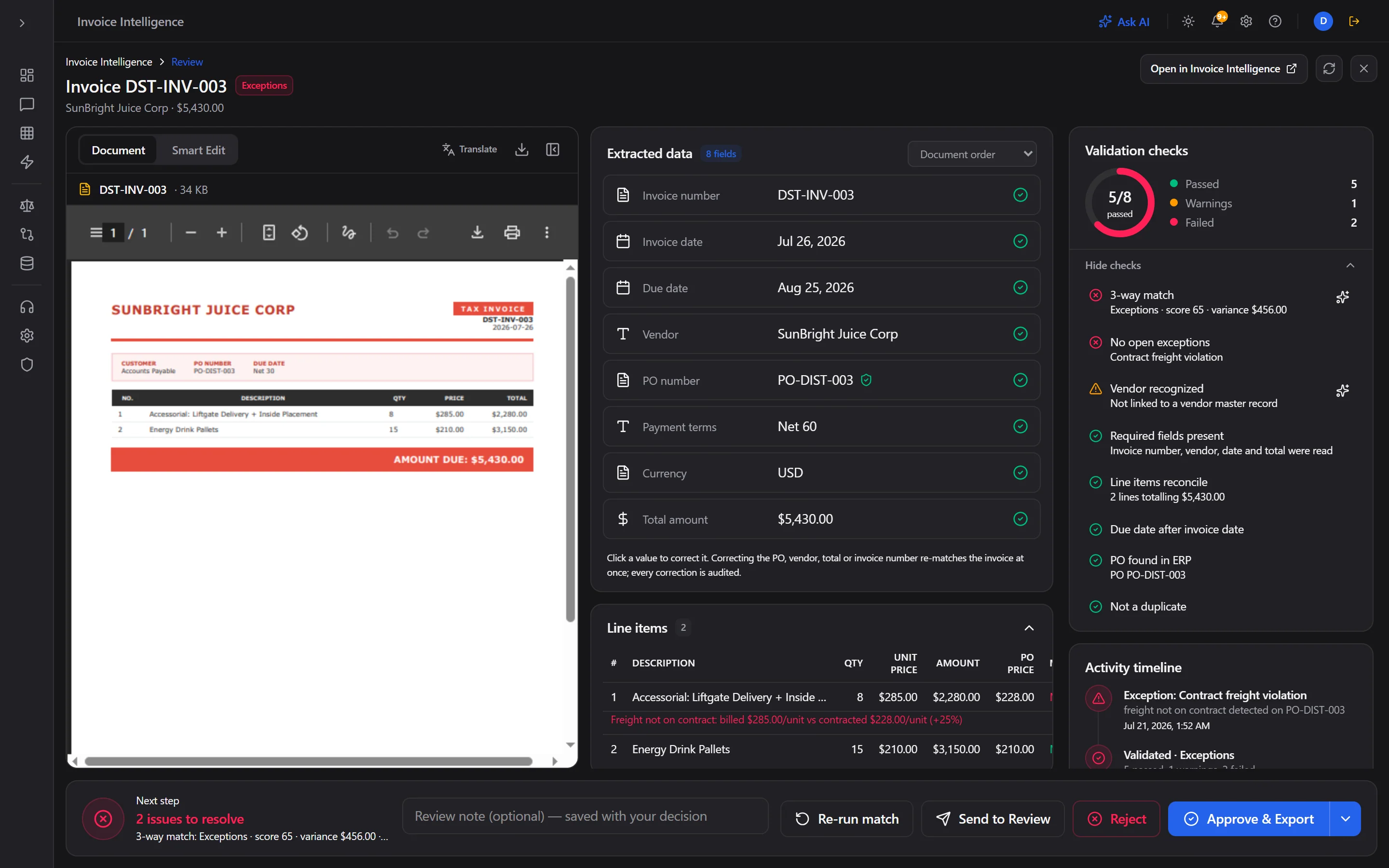
Review & Export: the source invoice beside every field read, the validation checks, and Re-run match, Reject or Approve & Export. Live product, synthetic data.
1 screen
Review, Correct, Approve, Export
Instant
Re-match on Correction
100%
Corrections Audited
7
Delivery Options
How it works
Open the invoice
From the worklist, an exception, a notification or straight after an upload. The source document, extracted fields, line items, checks and activity timeline sit on one screen.
Check the reading
Every field shows how it was read and whether it passed: 3-way match, contract price, vendor recognised, required fields, line totals, due date, PO found in the ERP and duplicate check.
Correct and re-match
Click a value to fix a misread PO number, vendor, total or line. The correction is validated, written to the invoice and audited, and the invoice re-matches against the PO and receipt at once.
Approve & export
Approve, reject or send to review with a note. Approve & Export runs your own export profile for that invoice: the ERP target, the fields, the format and the delivery.
Capabilities
Source beside the reading
The original PDF, with Smart Edit and translation, next to every extracted field and its verification, so nobody has to switch screens to check a value.
Validation checks you can read
Pass, warning or fail for each check, with the reason: variance against the PO, freight not on contract, vendor not in the master file, duplicate risk.
Corrections never approve
Fixing a field changes what the invoice says, not whether it is paid. Approval stays a separate, attributed decision.
Re-run match on demand
When the PO or receipt changes in the ERP, re-run the match from the same screen. Approved and rejected invoices are locked.
Export your ERP accepts
CSV, JSON, XML, Excel or fixed text, delivered by download, SFTP, email, API, S3, Azure Blob or a network drive, through the export profiles you configure.
One screen for invoices and charts
The same review workspace runs clinical chart review in Healthcare Intelligence, so finance and clinical teams share one way of checking AI work.
Frequently asked questions
What can a reviewer correct?
The invoice header (invoice number, dates, vendor, PO number, terms, currency, total) and its line items. Changes the match depends on, such as the PO, vendor, total or invoice number, re-match the invoice at once.
Is the original invoice changed?
No. The source document is never edited. The correction is written to the invoice record and its match, kept on the record and audited with who changed what and when.
How does export work?
Approve & Export runs the export profiles you set up under Configure, for that invoice only: which ERP, which fields, which format and how it is delivered. Profiles can also run on a schedule.
Who can approve?
People with decision rights on the invoice's review level. Viewers can look but not decide, and an invoice can be escalated to the next level or a named person from the worklist.
See what we find before you commit.
Read-only connection. We review a sample of your invoices, agreements and supplier spend, then hand back a findings report with specific figures. If there is nothing to recover, there is nothing to pay.